How to cancel OurDream AI: steps, DreamCoins, refunds and what to switch to
Where the cancel button is, what happens to your DreamCoins and annual plan, what the terms say about refunds, how to delete the account, and which app fits what you wanted.
By AI Companion Radar Editors
· 4 min read

OurDream AI is a web app, so there is no App Store or Google Play subscription to hunt for. Cancellation happens in the account area and takes a minute. This guide covers the steps, what happens to DreamCoins, the difference between the monthly and annual plan, what the terms say about refunds, and where to go next depending on why you are leaving. It is based on the published terms and pricing as of September 2026.
The steps
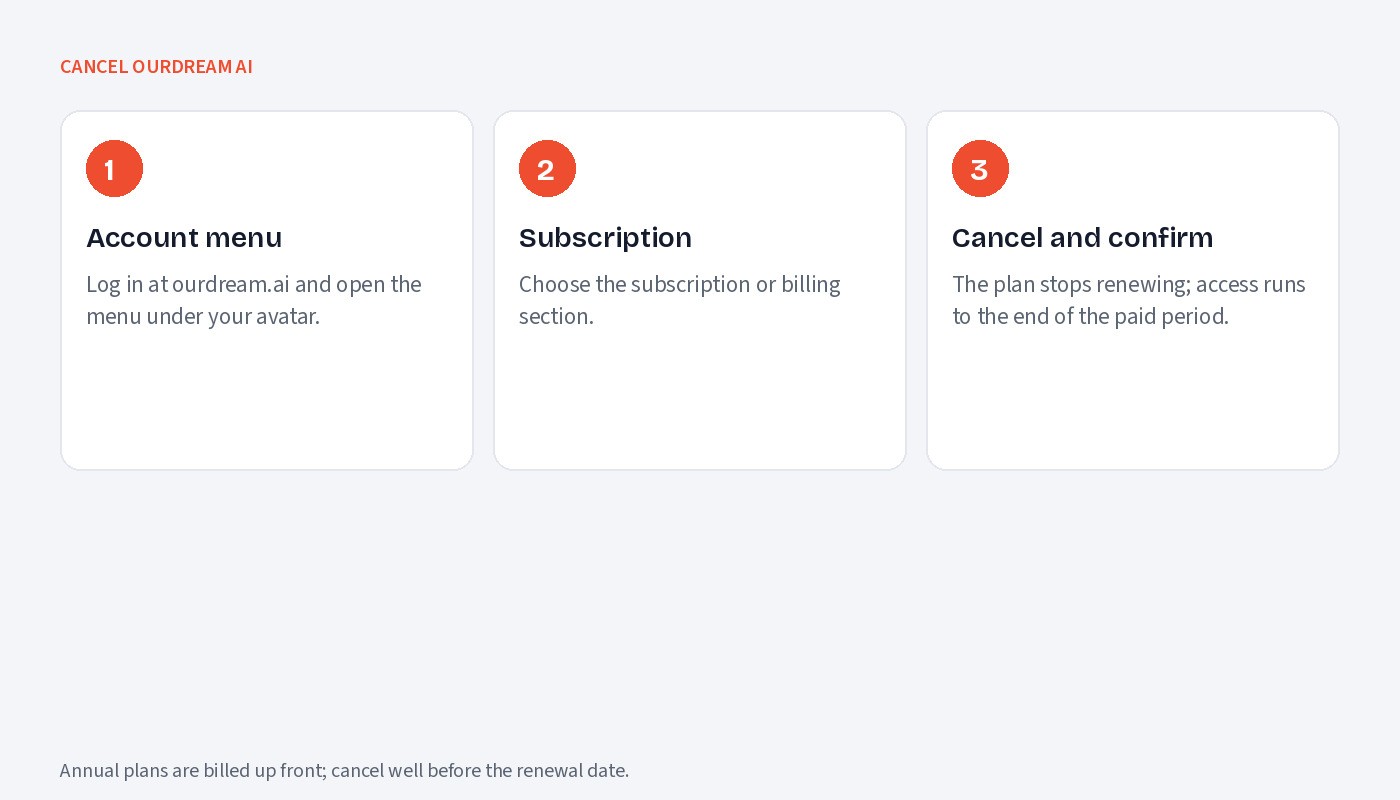
Log in at ourdream.ai and open your account or profile menu, usually via your avatar in the corner.
Choose the subscription or billing section.
Select cancel and confirm. Your plan will not renew, and access continues until the end of the period you have already paid for.
Keep the confirmation. If the option is missing, contact support from the address on the site before the renewal date, and keep that message too.
What happens to DreamCoins
Paid plans include 1,000 DreamCoins a month, and the annual plan adds a bonus 1,000. Coins are the currency for images and video. The terms shown at cancellation govern what happens to unspent coins, and there is no advertised guarantee that they survive or are refunded, so spend them before the period ends if you have generated less than you paid for.
Monthly versus annual
The monthly plan is $19.99. The annual plan is $119.88, which is $9.99 a month and roughly half the monthly rate over a year. Annual plans are billed up front, and cancelling stops the next renewal rather than refunding the months you have not used. If you are on annual billing, cancel well ahead of the renewal date and treat the remaining months as already paid.
Refunds
No proactive refund policy is documented; refunds are governed by the terms of service and handled case by case. The realistic expectation is no refund for partial periods. If you were charged after cancelling, reply to your confirmation email with the charge details.
Deleting the account
Deletion is separate from cancellation. Cancel the subscription first, confirm it has stopped renewing, then delete the account from the account settings or by request to support. Deleting removes characters, chats and generated media.
Why people leave OurDream
The complaints are consistent: DreamCoins burn fast on video, video quality is inconsistent between runs, and the free tier does not include video or voice. None of that touches what OurDream does well, which is scenario building and memory. Pick the replacement by which of these mattered.
What to switch to
Video that completes and costs a known amount: MyBabes, which publishes its per-second token rates on named engines and has a free tier. Trade-offs: browser only, no voice calls, EUR pricing.
Free chat and roleplay: SpicyChat, with unlimited free chat on basic models and documented tiers, or Dream Companion, a cheap annual plan with a lasting free tier as reported.
Native mobile apps with memory: Nomi AI or Kindroid, both with included voice calls; Kindroid publishes its memory limits and allows adult content with age verification, Nomi filters explicit images.
Every profile on this site lists the cancel steps for that app, so you can check the exit before you enter. There is a separate guide to cancelling Candy AI for anyone leaving both.
See the MyBabes homepage. Radar profiles: OurDream AI · MyBabes · SpicyChat · Dream Companion.
Apps in this article

MyBabes
Multi-feature
8.3
The broadest creative toolkit in the category: eight named video engines with published per-second prices, two image model lines, a story studio, AI-refereed roleplay games and a creator paywall. Browser only, no voice calls, and the token maths take a minute.
Images
Video
Voice
Memory
From €9.99/mo (3-month plan)
Editor’s pick

OurDream AI
Multi-feature
7.8
A US-registered companion with a published coin price list, decent DeepSeek-based chat and a real free tier. Video is the weak link: short, expensive and often unreliable. Good value on the annual plan for chat and images.
Images
Video
Voice
Memory
From $19.99/mo or $119.88/yr ($9.99/mo) with 1,000 DreamCoins/mo

Kindroid
Multi-feature
7.4
The most transparent power-user companion: published memory limits, a new Polaris model, explicit content for verified adults. The free tier ends on 1 October 2026; expect a stacked bill and credit meters.
Images
Video
Voice
Memory
From $13.99/month on the web ($11.67/month billed yearly); free preview of 50 interactions only
Editor’s pick

Nomi AI
Multi-feature
6.9
The strongest memory in mainstream companion apps, with expressive voice included, held back by suggestive-only images, a no-refund policy and pricing you only see after signing up.
Images
Video
Voice
Memory
From $15.99/month ($8.33/month billed yearly); free tier available

Dream Companion
Multi-feature
6.7
Among the cheapest explicit roleplay platforms on an annual plan, with a clear blocked-content list. Coin costs are hidden until you pay, voice is weak and charged per replay, and media quality is average.
Images
Video
Voice
Memory
From $5.84/mo (annual)

SpicyChat
Roleplay
6.6
An uncensored, community-driven roleplay platform with a genuinely usable free tier, transparent pricing and a strong model line-up. Short replies, small context on cheaper tiers, no iOS app and regional age checks are the trade-offs.
Images
Voice
Memory
From Free; Get A Taste $5.95/month or $60/year (from 8 September 2026)
More from Radar
AI companion apps and your privacy: what 55 apps do with your chats
44 of 55 apps store your chats, 13 may train on them, 34 do not say. The privacy terms of every app in the directory, in one table.
Kindroid pricing: plans, add-ons, credits and what a month costs
Kindroid costs $13.99 a month on the web, $15.99 in the apps, $98.97 with both add-ons. Every price, three worked monthly bills, the post-October trial, cancel steps and refund wording.
SpicyChat vs MyBabes: roleplay chat or generation studio?
SpicyChat wins on text roleplay, named chat models, free chat and its $5.95 entry price. MyBabes wins on images, video, stories and creator income. They suit different users.
How to cancel Kupid AI: weekly billing, refunds and deletion
Cancel Kupid AI in your account on kupid.ai or by emailing hello@kupid.ai. Weekly plans renew every seven days, sales are final under the terms, and plan Coins expire after six months.
What images and video really cost on 55 AI companion apps
Ten different in-app currencies, most rates unpublished. The lowest plan, the unit, and the price of an image and a clip on every app in the directory.
CCBill charge on your card: what it is and which AI app billed you
A CCBill charge means a site that uses CCBill billed you. Look it up on support.ccbill.com, cancel there, ask for a refund, and see which AI apps name their processor.
Dondi AI pricing: Premium, token packs and the 24-hour refund rule
Dondi AI Premium is $14.99 a month ($5.99 on the yearly plan) with 200 tokens; images from 5 tokens, clips 50. Refunds only within 24 hours despite a 7-day promise. Worked bills and fine print.
Gay AI boyfriend apps: which ones have a real male-for-male catalogue
Janitor AI, SpicyChat and Chub AI have real gay-tagged catalogues; MyBabes has a dedicated “Create him, gay” builder; OurDream AI asks your orientation; Kindroid lets you build him.
Is Eva AI safe and worth it? Privacy, prices and the catch
Eva AI is run by Novi Limited in Cyprus and collects your messages to develop its AI with no opt-out; prices run $11.99 to $15.99 a month plus unpriced Neurons, and store purchases are final.